
Calm Drive for iPhone

Know your drive.
Build your skill.

Turn everyday miles into thoughtful practice. Understand the moments that matter — and take one clear next step.

Available on TestFlight. Designed for iPhone.

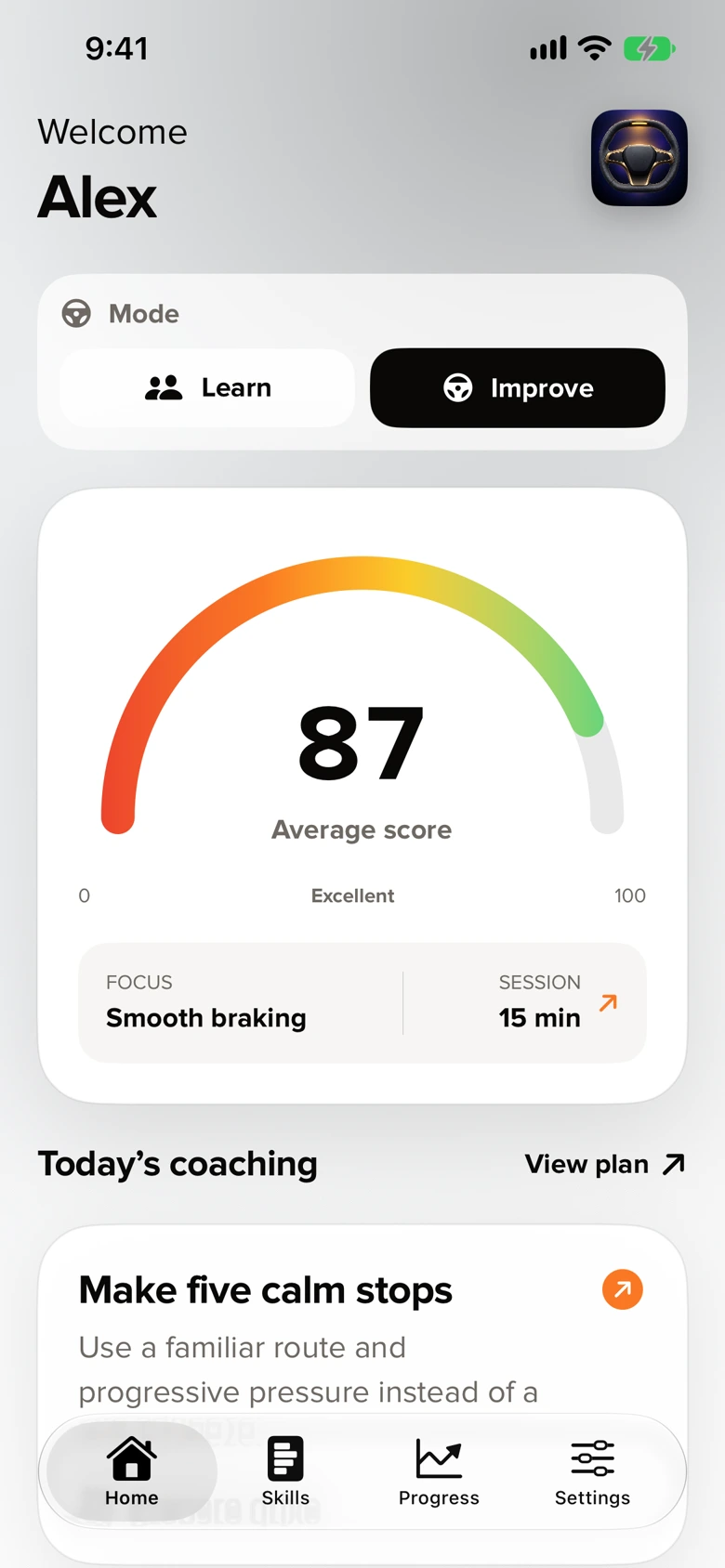
Actual Calm Drive Home with a driving score and a focused coaching mission
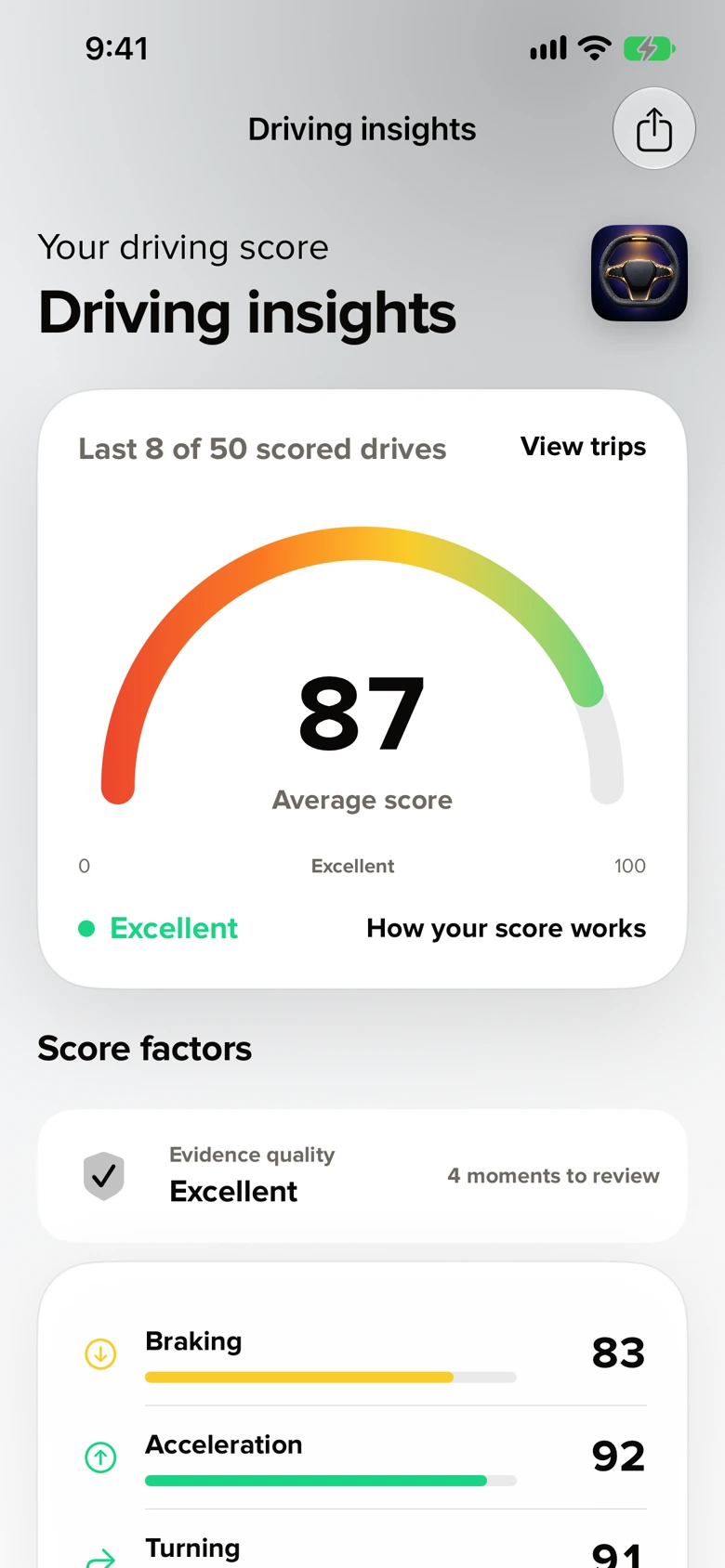
Actual Calm Drive Driving insights with an average score and four score factors

Actual app screens. Demonstration data.

Practice with a clear focus Understand your driving Keep control of your data See your progress over time

THE EXPERIENCE

A good drive starts
with a little intention.

Choose your focus. Leave your phone mounted.
Make time for one useful reflection when you park.

BEFORE YOU GO

One small focus.
Room to improve.

Earlier braking. A more measured turn. Pick a mission with specific cues, then practice on the route you were already going to take.

Know what to notice
Read the practice cues before you leave. Keep one clear focus, such as lifting earlier before a stop.
Make it part of your route
Practice on the trip you already planned, with the phone mounted and the setup finished while parked.
Explore the coaching paths

Prepare while parked. Keep the phone mounted during the drive.
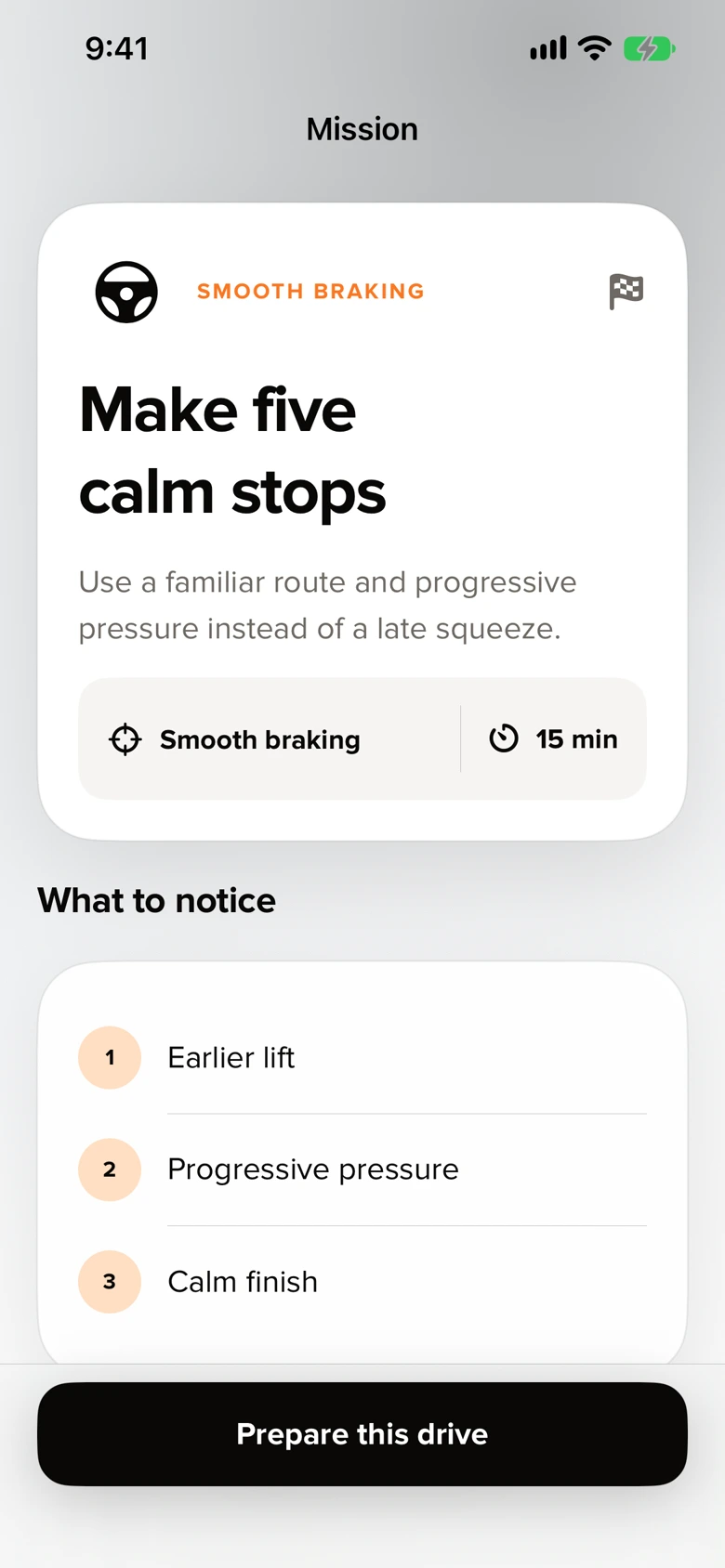
Real mission screen: Make five calm stops, with practice cues

Actual app screen · Demonstration data
AFTER YOU PARK

The numbers start
a conversation.

Review the moments that stood out. Add the context only you know, acknowledge what went well and choose what to repeat.

Bring your perspective
Look at the recorded moments, flag an incorrect event and add the context the sensors cannot know.
Take one thing forward
Keep a positive observation and choose one correction to work on during your next ordinary drive.
Look inside a sample drive

A sudden stop can be the right decision. Motion evidence is not a safety verdict.

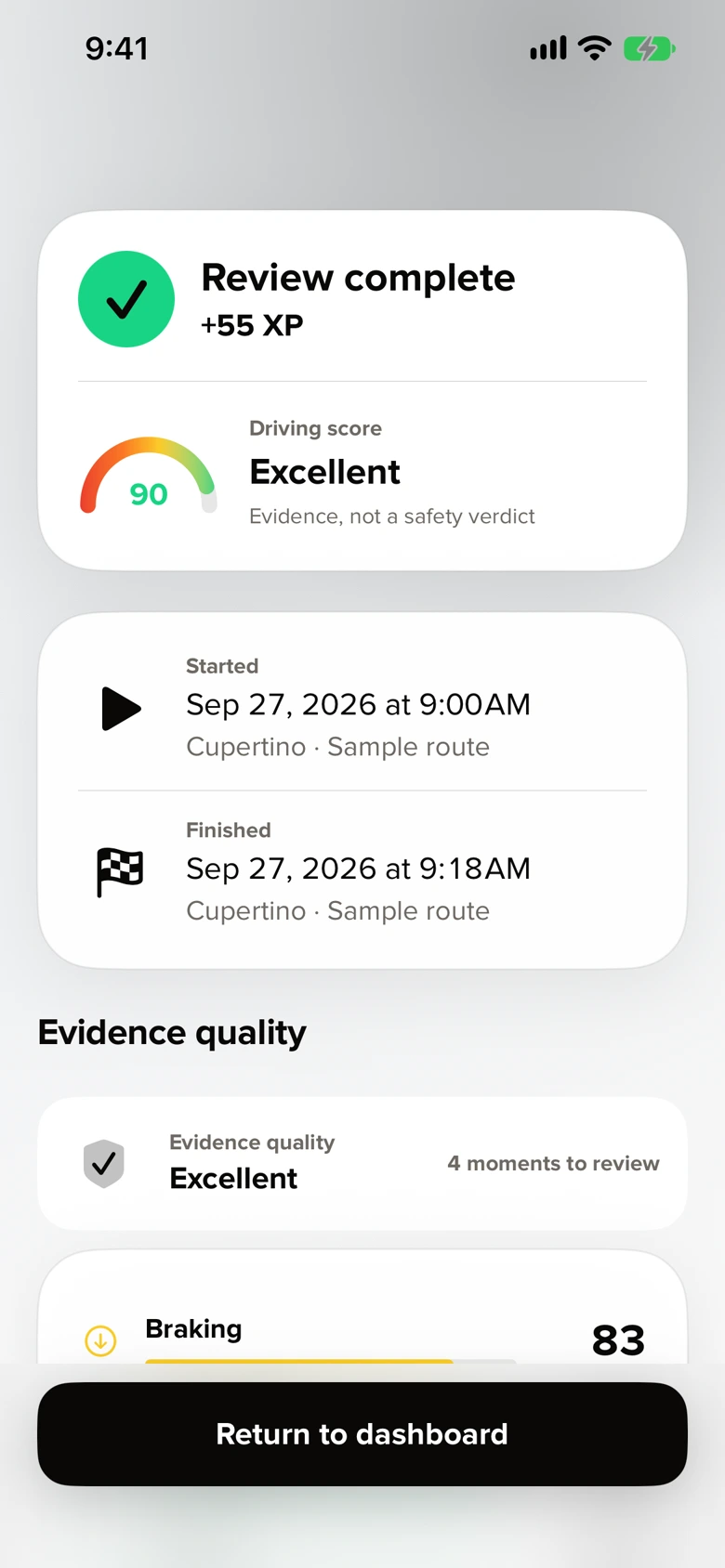
Real completed review with score 90, trip details and evidence quality

Actual app screen · Demonstration data

OVER TIME

A clearer picture.
Drive after drive.

See your average and the factors behind it. Look back across reliable, reviewed drives to understand where to focus next.

Look beyond the average
See braking, acceleration, turning and speed stability separately, with evidence quality alongside your results.
Find your next focus
Use the pattern across reviewed drives to choose a skill to practice. A single score is only part of the picture.
Explore a sample result

Explore up to 50 scored drives in Driving Insights.

Real Driving insights screen showing an average of 87 across eight demonstration drives

Actual app screen · Demonstration data

In between? Just drive. Calm Drive records motion and GPS evidence in the background. Set up your preferred audio coaching before you leave.

A CLOSER LOOK

Behind every score,
there’s a drive.

Explore one demonstration trip. Select a moment to see why the context matters.

SAMPLE DRIVE

Make five calm stops

18 min · 3.3 miles · Daylight

90Driving score
0Excellent100
Evidence quality: Excellent

One drive. Four moments to review.

Speed · mph
Speed over an 18-minute demonstration driveA sample speed trace with four review moments at 4 minutes 12 seconds, 8 minutes 18 seconds, 12 minutes 36 seconds and 15 minutes 24 seconds. Select a moment using the buttons below.01020300:003:006:009:0012:0015:0018:00
04:12/ 18:00
Speed at this momentSelect a moment below

04:12 · Braking

A moment to slow down.

The phone recorded a sharper stop. Was it a late reaction, or the right response to what happened ahead?

For the next driveLook farther ahead and lift off a little earlier.

08:18 · Turning

A turn worth revisiting.

A change in lateral motion stands out. Road shape, surface and traffic all help explain what the sensors saw.

For the next driveSet your speed before you enter the turn.

12:36 · Acceleration

Build speed, progressively.

A brief acceleration moment appears in the record. Review it while parked, when you can add the missing context.

For the next driveAdd pressure gradually as you move away.

15:24 · Braking

Finish the stop smoothly.

A second braking moment offers another point to reflect on. One event alone does not tell the whole story.

For the next driveEase the final pressure as the car settles.

THE FACTORS BEHIND THE SCORE

Braking83
Acceleration92
Turning91
Speed stability94

Interactive explanation using the same demonstration trip as the app captures. Scores describe measured motion, not safety or driving-test readiness.

SKILLS & COACHING

A clear next step,
at every stage.

A whole curriculum, broken into one thing to practice today. Each mission includes what to notice, a common mistake and a reason to stop or skip.

PRACTICE WITH A SUPERVISOR

Build the foundations together.

For learners practicing with a parent or another permitted supervisor. Agree on one focus before you go, then review it together.

More to explore

Also covers observation, intersections, residential roads, parking, space, merging and supervised progression.

Set up before movingMounted and ready · 8 min
WHAT TO NOTICE
  • Seat and mirrors support a clear view
  • Phone is rigidly mounted
  • Route and first move are understood

Ask the learner to explain the setup in their own words.

Stop if visibility, controls, supervision or the mount is not ready.

Brake earlierSmooth stops · 15 min
WHAT TO NOTICE
  • Lift early
  • Build pressure progressively
  • Finish without a final lurch

Coach one thing only: ask for an earlier lift before the next stop.

Skip if traffic or road conditions make ordinary stopping practice inappropriate.

Set speed before the turnControlled turns · 18 min
WHAT TO NOTICE
  • Slow before steering
  • Look through the turn
  • Unwind without correction

Watch the approach and steering recovery, not just the middle of the turn.

Do not create extra turns or use an unfamiliar intersection for points.

BUILD ON YOUR EXPERIENCE

Keep refining the everyday.

For licensed drivers who want to work on a specific habit. Use your ordinary trips, your own evidence and an optional passenger review.

More to explore

Also includes cornering, speed and space, anticipation, lane changes, phone setup and familiar-route practice.

Make five calm stopsSmooth braking · 15 min
WHAT TO NOTICE
  • Earlier lift
  • Progressive pressure
  • Calm finish

Notice when braking begins; do not chase the live indicator.

Use only ordinary real trips; do not create extra miles.

Build speed progressivelyProgressive acceleration · 15 min
WHAT TO NOTICE
  • Gentle initial input
  • Stable build
  • No overshoot

Compare feel and evidence only after parking.

Do not impede traffic or accelerate for a score.

Ask after parkingPassenger comfort · 20 min
WHAT TO NOTICE
  • Calm stops
  • Calm turns
  • Stable flow

Pair motion evidence with a passenger’s own view of the ride.

No passenger feedback is required during movement.

MADE FOR YOUR IPHONE

Fits into the drive.
Stays out of the way.

Set up once, while parked. Keep navigation in front. Bring a small, useful view of your practice to the places you need it.

On your dashboard

CarPlay companion

With Plus, see session state, your focus and GPS quality on a compatible CarPlay display. Set up on iPhone before moving.

At a glance

Live Activity

Keep session status on your Lock Screen and Dynamic Island, with CarPlay Dashboard support where available.

Between drives

Home & Lock Screen widgets

Keep your driving average, weekly practice or next mission close by. No detailed routes in the widgets.

Compatibility depends on iPhone, iOS and vehicle. The CarPlay companion requires Plus.

BUILT AROUND YOUR PRACTICE

Different starting points.
The same intention.

Start with where you are today.
Choose the kind of practice that fits your next drive.

LEARNERS & SUPERVISORS

Learn together.

A clear practice goal for the learner. A short coaching note for the supervising adult. A conversation after parking.

A place to startBrake earlier, together.

Agree on the cue before setting off. Talk through what you noticed after parking.

Explore learning missions
LICENSED DRIVERS

Keep improving.

Work on braking, turns or anticipation after you get your license. Keep learning from the trips you already make.

A place to startMake five calm stops.

Notice your earlier lift, progressive pressure and calm finish on an ordinary trip.

Explore improvement missions
PASSENGER PERSPECTIVE

Think about the passenger.

Bring an optional comfort rating into the review. Compare what the sensors recorded with how the ride felt.

A place to startAsk how the drive felt.

Pair an optional comfort rating with the motion evidence after you park.

See a parked review

Set up while parked. Practice on ordinary trips. Reflect when you arrive.

CALM DRIVE PLUS

More room to
keep improving.

Start with the core practice loop. Plus adds a longer view of your progress and more ways to bring coaching along.

Calm Drive Plus icon
$0.99/ month

Planned US price. Paid App Store release pending.

Compare Calm Drive Free and Plus
Your practice, at a glanceFreeStart practicingPlusKeep progressing
Coaching missions & parked reviewIncludedIncluded
Audio coachingMinimal promptsFull coach
History & trends5 recent drives¹Full history & trends
PDF & CSV practice reports—Included
CarPlay companion—Included
Appearance2 themesPremium themes & icon
Parked sponsor placementsMay appearRemoved

Plus is an auto-renewing monthly subscription. Final pricing and availability are shown in the App Store. Manage or cancel through your Apple subscription settings.

¹ Free history view shows five recent drives. Driving Insights is a separate view. Road-awareness monitoring is in development and depends on a configured road-data service; mapped limits may be missing or outdated.

View TestFlight beta

LOCAL-FIRST BY DESIGN

Your practice.
Your choice.

Your profile, reviews and retained drive history are stored on your iPhone. Choose how much route detail to keep. Export when you decide, or delete local records in Settings.

Read the privacy details
YOUR ROUTE, YOUR CHOICE

Keep the route

Review the trip and its event locations on your iPhone.

Keep events, remove coordinates

Keep coaching evidence without a route map.

Remove the route after analysis

Keep the final summary.

Optional road matching sends a short GPS trace to a road-data provider. Apple services also support maps, purchases, Game Center and TestFlight. See the privacy details for what can leave your phone.

GOOD TO KNOW

A few things,
made clear.

Choose a topic to find the details you need.

Visit support

Getting started

3 questions
How do I start, and can I use navigation?

Choose a mission or Normal drive while parked, confirm the phone is rigidly mounted and complete the ready check. Recording can continue while another app is open, with the required permissions and available signals. Do not interact with Calm Drive while moving.

Can a learner use Calm Drive with a parent?

Yes. Learn provides a structured curriculum, supervisor notes and a review after parking. The learner must have any required permit and a legally permitted supervisor. Calm Drive does not replace professional instruction. The current family review happens on the same iPhone; there is no shared family tracking account.

Which languages are in the app?

The app includes English, German, French, Spanish, Simplified Chinese, Brazilian Portuguese and Russian, plus experimental Hebrew. Some long-form coaching content still needs native-language review. This website is currently in English.

Scores & review

2 questions
Is this a safety or insurance score?

No. Calm Drive estimates motion smoothness from available phone signals. It cannot determine whether a drive was safe, legally compliant or road-test ready, and it does not provide an insurance rating. Road conditions and your judgment always come first.

What if an event was necessary or incorrect?

After parking, add context such as an emergency stop or rough road, or mark an event as incorrect. The app provides controls to exclude contextual or misclassified events from progress calculations. Never change a necessary action on the road to protect a score.

Privacy & exports

2 questions
What happens to my route and feedback?

Retained app records stay on the iPhone unless you choose to share or export them. Route storage has three options. Optional road matching sends a short recent GPS trace to a configured provider; Apple map, purchase and Game Center services have their own data flows. Exported diagnostics remove coordinates but can still include trip times, place names and your review text.

Can I export a practice log?

Plus includes PDF and CSV practice reports. They are informational records, not a DMV certificate, a road-test verdict or proof of legal compliance. Acceptance depends on the relevant authority.

Plus & CarPlay

2 questions
Is Plus available to buy?

The intended US price is $0.99 per month, automatically renewing. The paid App Store release is still pending; the website does not sell a subscription. TestFlight is a beta environment. The App Store will show final pricing, availability and terms before any production purchase.

What do I need for CarPlay?

The full Calm Drive CarPlay companion requires Plus, a compatible iPhone and a CarPlay-equipped vehicle. Live Activities are a separate system surface. Feature availability can differ by iOS version and beta build; check the current TestFlight notes.

YOUR NEXT DRIVE IS A NEW CHANCE.

Your next drive.
A little more intentional.

One focus. One drive. One thing to take forward.

View TestFlight beta

Calm Drive for iPhone · TestFlight beta